Miscellanouse bits that I found interesting:
- Bioshock Pitch
- Orchestra treatment of Woven Variations from Journey
- The numbers of mobile gaming (for you mobile game devs)
- This year's GDC Game Design Challenge: Bigger than Jesus (Features Jason Rohrer, John Romero and Jenova Chen)
- Board Games with comedian Tommy Dean
- ABC radio on the changing shape of the Australian Games industry and new opportunites Download the mp3
Sunday, July 31, 2011

Friday, July 29, 2011
Graduating with Griffith
If you're the kind of person that wants to avoid talking to people or queing up then this might be for you. I give you Griffith's online details about checking your graduation using the Griffith Portal. This feature will probably become available around Monday 1st of August. I'm sure you can always talk to Admin if you're not trusting of anything I happen to spout.
Wednesday, July 27, 2011
Wreckless Conduct: Debuggery
Unity
It has been a long time between updates but I spent a lot of it debugging my level builder and associated scripts. It contains less bugs than before and few more options.

This a quick tool that I wrote to make using Inicus' Cube Interpret System easier to use.
 It snaps cubes (any prefab) to a sizeable "tile grid" (Wreckless uses 3x3x3 metre scale), lets you scale the selected items by the scale (+n in x,y,z) and lets you add a tag to the selected. Which is important so the Cube system knows what to turn cubes into.
Road Intersections can align (it's a little buggy) before they generate roads and there's highways happening. I will be working on getting ramps and barriers on those intersections up.

Prop Zones are little areas that will be scattered around the levels that generate props for you to crash into. It saves me time having to place the props in manually. There are a variety of options for how props are spawned inside the zone. It's still a small work in progress, I have yet to find an elegant way to code it.


Skybox Progression
Although it's not apparent, Wreckless is meant to be full of hive city environments so the skybox should reflect it. I dislike matte painting but it's just how I've decided to get something up.


A shot of an unfinshed 3D version.

If there are any artists around who'd like to do some modelling or matte painting, it would certainly save us some time and look 1000 times better. Feel free to contact me or Inicus if you want to work on a cyberpunk environment.
Mel scripting
I got tired of having to set up all my default scene cameras' near and far clip planes so I wrote a mel script. I could add more functionality to it but this is good enough for me.

I spent a lot of time on the break trying to script a tool that will copy animations from 1 rig to another. So far no dice. But hopefully I can get back into it once I've picked some brains of far more intelligent people than I.


It has been a long time between updates but I spent a lot of it debugging my level builder and associated scripts. It contains less bugs than before and few more options.

This a quick tool that I wrote to make using Inicus' Cube Interpret System easier to use.

Road Intersections can align (it's a little buggy) before they generate roads and there's highways happening. I will be working on getting ramps and barriers on those intersections up.

Prop Zones are little areas that will be scattered around the levels that generate props for you to crash into. It saves me time having to place the props in manually. There are a variety of options for how props are spawned inside the zone. It's still a small work in progress, I have yet to find an elegant way to code it.


Skybox Progression
Although it's not apparent, Wreckless is meant to be full of hive city environments so the skybox should reflect it. I dislike matte painting but it's just how I've decided to get something up.


A shot of an unfinshed 3D version.

If there are any artists around who'd like to do some modelling or matte painting, it would certainly save us some time and look 1000 times better. Feel free to contact me or Inicus if you want to work on a cyberpunk environment.
Mel scripting
I got tired of having to set up all my default scene cameras' near and far clip planes so I wrote a mel script. I could add more functionality to it but this is good enough for me.

I spent a lot of time on the break trying to script a tool that will copy animations from 1 rig to another. So far no dice. But hopefully I can get back into it once I've picked some brains of far more intelligent people than I.


Monday, June 6, 2011
Wreckless Conduct: Level Building Phase 1
While I would love to ammend the above title with "complete", this puppy has got a snowballing effect on it. One day I expect it to implode itself or explode my brain. Any day now.
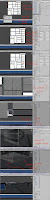
Here's some progress shots of trying to roads to spawn around intersections:

The Level Builder 'menu':

I found it easier to import my reference image in so I can lay pieces out to fit the map. It's a little buggy but it works enough for me.

Placement of objects/world elements:
I'm going to be working on this for quite some time. There's a big list of bugs to fix and some added extras that would make level building easier. I'm going to take a break and then start making things better.
If anyone needs to construct a litmas test for the 90's, consider the raddest cat.
Here's some progress shots of trying to roads to spawn around intersections:

The Level Builder 'menu':

I found it easier to import my reference image in so I can lay pieces out to fit the map. It's a little buggy but it works enough for me.

Placement of objects/world elements:

I'm going to be working on this for quite some time. There's a big list of bugs to fix and some added extras that would make level building easier. I'm going to take a break and then start making things better.
If anyone needs to construct a litmas test for the 90's, consider the raddest cat.
Sunday, May 29, 2011
Links: Unity Tools
Level building is pretty fiddly but here are links that might make it easier:
Positioning Objects via the Unity Manual. Check out the notes on Unit and Vertex snapping.
Align Positions via the Unity Manual. An example script from Unity.
Snap to Grid by Hayden Peake: Can be useful if you're working on a grid layout and to a particular scale.
LineMup by Matthew J. Collins. Aligns and distributes even spacing between selected objects. Comes with an instructional video.
Transform Utilites by Daniel Rodríguez (Also found here): A pretty hand tool for aligning objects in a scene, it's a little more technical than the other options but makes things much easier.
Now back to scalding my eyeballs with Wow-Wow Sauce and other ritualistic activities that make up level building. A proper post is coming
Positioning Objects via the Unity Manual. Check out the notes on Unit and Vertex snapping.
Align Positions via the Unity Manual. An example script from Unity.
Snap to Grid by Hayden Peake: Can be useful if you're working on a grid layout and to a particular scale.
LineMup by Matthew J. Collins. Aligns and distributes even spacing between selected objects. Comes with an instructional video.
Transform Utilites by Daniel Rodríguez (Also found here): A pretty hand tool for aligning objects in a scene, it's a little more technical than the other options but makes things much easier.
Now back to scalding my eyeballs with Wow-Wow Sauce and other ritualistic activities that make up level building. A proper post is coming
Monday, May 16, 2011
Wreckless Conduct: The Scent of Failure
Some progress shots of level building toolkit + Unity Editor + beating head on keyboard looks like. Finally got some kind of mouse click system which instantiates a prefab in the scene window.
For those interested, the code looks a little like this:
Failure is listed down below, I'm getting worried about how long this is all taking so any suggestions are most welcome.
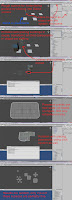
Edit: I've sort of resolved the fragmenting of prefabs, it had to do with my invoking of particular functions. I will be working on the functionality of the level builder.

This one is a little old but it does show that I've resolved a strange problem with the math that determined where a collider positioned itself and when you resized buildings.
For funs:
Minecraft - Unity Style. Also has a playable demo.
For those interested, the code looks a little like this:
//
OnScenGUI is how the Editor handles events in the scene windowfunction OnSceneGUI() {
// Handles are like Gizmos
// Draw cube at 0,0,0 when level builder is on
Handles.color = Color.red;
Handles.CubeCap(0, Vector3.zero, Quaternion.identity, 0.5);
if(editMode) {
if(Event.current.type == EventType.MouseDown) {
if(Event.current.button == 0) {
var ray = HandleUtility.GUIPointToWorldRay(Event.current.mousePosition);
var dist : float;
// Cast a ray on a "fake" plane (The Plane class in Unity is a "Representation of planes")
// If ray hits the plane (grid stand in), use the current mouse position to instantiate our prefab
if(grid.Raycast(ray, dist)) {
var pos : Vector3 = ray.origin + ray.direction.normalized * dist * 0.5;
Debug.Log("Placed fab at: " + pos);
// Using EditorUtility.InstantiatePrefab does stop me from creating clones of my prefab
// I could still use Instantiate(gameObject, pos, Quaternion.identity) here as well
var currentPiece : GameObject = EditorUtility.InstantiatePrefab(target.currentFab);
// Seems like the line below is causing some problems
currentPiece.transform.position = pos;
}//END grid Raycast
}//END Mouse Left Click
}
// Prevent deselection of object while in Edit Mode
Selection.activeGameObject = target.transform.gameObject;
}//END In Edit Mode
}//END OnSceneGUI
Failure is listed down below, I'm getting worried about how long this is all taking so any suggestions are most welcome.

Edit: I've sort of resolved the fragmenting of prefabs, it had to do with my invoking of particular functions. I will be working on the functionality of the level builder.

This one is a little old but it does show that I've resolved a strange problem with the math that determined where a collider positioned itself and when you resized buildings.

For funs:
Minecraft - Unity Style. Also has a playable demo.
Tuesday, May 10, 2011
Wreckless Conduct: Streets of Hell
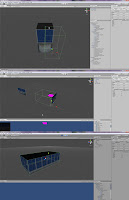
With about 4 weeks to go, I decide to start scripting things that will help with level building. Yes, I have under-estimated the enormity of this task. Here's a look at what I've been working on.
Building scripts for prefabs:

Material randomiser:

To Do:
- City layout
- Roads
- Buildings
- Props
Building scripts for prefabs:

Material randomiser:

To Do:
- City layout
- Roads
- Buildings
- Props
Subscribe to:
Posts (Atom)